
» EMAIL OUTREACH
Cold email outreach: emails that get delivered and get replies.
Cold email outreach: separate domains and warmed-up mailboxes, verified addresses, copy for every segment. We write to people who are not on LinkedIn or stay silent there, - personal emails, not a mass mailing.

REPLY · INTERESTED
Martin K. · Head of Procurement
Distribution · Poland · 120 people
EMAIL TEXT
"Sounds interesting. How about Thursday at 14:00?"
WHAT WE DO
- We confirm the time and put the meeting in your sales rep's calendar
- We send reminders 24 hours and 1 hour before
When people read your copy, they are alone. Pretend, you are writing to each of them a letter.
» WHO IT SUITS
Who cold email outreach is for.
Choose your situation - we will show where we start. If LinkedIn suits you better, we will tell you at the audit.

Few of your buyers are on LinkedIn.
Manufacturing, logistics, construction, markets where LinkedIn is not the main network. Everyone has email.

You already run LinkedIn outreach.
Some people stay silent on LinkedIn. We email them.

You are entering a new market.
You need to understand whether the market responds before hiring people.
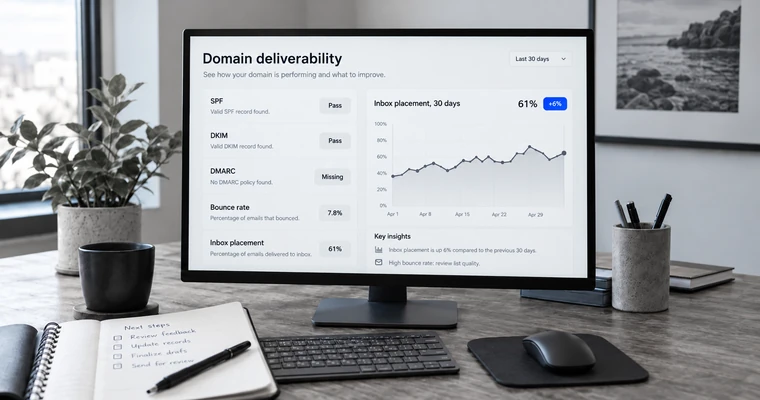
Your emails already land in spam.
You sent mailings yourselves or with another agency, and the replies disappeared.
WHERE WE START
» See the packages» HOW IT WORKS
Infrastructure first, then the emails.
For the first 2-3 weeks there are no emails at all: the mailboxes are warming up. Whoever skips this step writes into spam.
Domains and mailboxes
WHAT YOU GET
- Separate domains and mailboxes for your company
- Your main domain stays out of risk
Warm-up
WHAT YOU GET
- Mailboxes that Gmail and Outlook trust
Database and address verification
WHAT YOU GET
- A list of people with positions and companies
- Only verified addresses
Copy
WHAT YOU GET
- Copy approved by you
Sending
WHAT YOU GET
- Emails that look like they come from a person
Replies and leads
WHAT YOU GET
- Meetings in your sales rep's calendar
- A lead table or your CRM
Weekly report
WHAT YOU GET
- A weekly report and a plan of changes
» WHY EMAILS DO NOT GET THROUGH
Why cold emails land in spam.
Four mistakes that stop a mailing from getting replies, - and what we do instead.
01 · Main domain
Your own domain in spam.
Complaints about a mailing hit the domain's reputation - and your team's work emails start landing in spam.
Us: separate domains similar to yours. We do not touch your main domain.
02 · Template
One template for a thousand.
The same email to everyone except for the name. Email services see a mass mailing, and so does the person.
Us: copy for every segment and a first line about the person.
03 · Bought database
A bought database.
The addresses are out of date, some no longer exist. Delivery failures damage the domain's reputation from day one.
Us: we build a database for your ICP and verify every address before sending.
04 · One email
One email and silence.
The person may not have seen the email or put it off. Without follow-up steps the conversation never starts.
Us: a sequence of 3-4 emails with different reasons to write. A reply stops it immediately.
The addresses are anonymised, the emails are an example.
» ANATOMY OF AN EMAIL
What the person sees in the email.
An email should look like it comes from a person, not from a mailing. Here is what it is made of - and what we do with each part.
Martin, I saw the news about your warehouse in Wrocław. Congratulations on the expansion.
We supply packaging to distributors in Poland. •••••• in Poznań has been working with us for a second year: weekly deliveries, no warehouse downtime.
Would it make sense to talk for 15 minutes next week?
Oksana Kovalchuk
Export manager · Vector ExportNot the right time - reply "no" and I will not bother you again.
» REPLIES
Cold email lead generation: what we do with every reply.
A reply is not yet a lead. An SDR goes through each one, and every type has its own next step.
They replied

"Sounds interesting. How about Thursday at 14:00?"
Re: Warehouse in Wrocław
WHAT WE DO
- We confirm the time and send the invitation on behalf of your sales rep
- We pass on the context: who the person is, what is going on at the company, what caught their attention
- We send reminders 24 hours and 1 hour before
RESULTA meeting in the calendar
We agree with you at the start what counts as a lead: usually it is an "interested" reply from a person in your ICP. The people and emails are made up.
» WHAT IS INCLUDED
Infrastructure for your volume.
Move the slider: as many new people a month as you need - that is how many mailboxes, domains and database records it takes. We set all of it up.
IN EVERY PROJECT
- Domains similar to yours and mailboxes on them
- SPF, DKIM and DMARC: setup and check
- Mailbox warm-up and domain reputation monitoring
- A database for your ICP and verification of every address
- An email sequence approved by you
- Sending and unsubscribes
- A weekly report, a lead table or your CRM
domainmailbox
Guideline: up to 4 emails per person over 22 working days, up to 25 emails a day per mailbox, up to 3 mailboxes per domain. We find an email address for roughly a quarter of the people in the database. The exact calculation - at the audit.
» CASE STUDIES AND FIGURES
Honestly about email as a channel.
Our own figures across all the years of outreach.
We build the LinkedIn list from profiles, so everyone has a profile. We find a work email for roughly a quarter of people.
Our own outreach across all the years and all the accounts. That is why for us email is a second channel next to LinkedIn, and the main one where LinkedIn is weak.
» PACKAGES
Packages.
We begin with Start, then Standard or Pro. We calculate the price for your market and email volume.
START
- Email system setup
- Domains and mailboxes
- Email warm-up
STANDARD
- Email warm-up
- Sending messages by email
- Correspondence from your work email
PRO
- Email warm-up
- Sending messages by email
- Correspondence from your work email
» TEAM
Who runs your campaigns.
There are people behind every email. The system administrator keeps the infrastructure running, the SDR handles the replies, and AI Office takes the routine.

» QUESTIONS
Questions and answers.
What is cold outreach and how is email outreach different from a mass mailing?
How much does cold email outreach cost?
Do you do appointment setting?
Will the emails land in spam?
Email or LinkedIn - which is better for B2B?
Where do the addresses come from?
When do the first replies come?
Is it legal: GDPR and CAN-SPAM?
» LET'S START
A free email outreach audit.
We will go through your ICP and market, check your domain and show you a plan: how many mailboxes, which database and when the first emails go out.
Email outreach request
The main thing - your ICP and market.
By clicking the button, you agree to the privacy policy.
» ALONG WITH EMAIL OUTREACH
What's next.
Email works best when it is not alone.


Account-Based Marketing
Cold email outreach for B2B.
Cold email outreach is personal emails to the people who make decisions in companies from your ICP. Email outreach at Linked Promo starts with infrastructure: separate domains, SPF, DKIM and DMARC, mailbox warm-up and verification of every address, - and only then the emails.
Cold emails work better together with LinkedIn outreach: email reaches the people who stay silent on LinkedIn. Appointment setting is the next step: we take an "interested" reply all the way to a meeting in your sales rep's calendar.